Notebook
Show the Plexora viewer inside a notebook cell, on a saved project or on an AnnData, SpatialData or array already in memory.
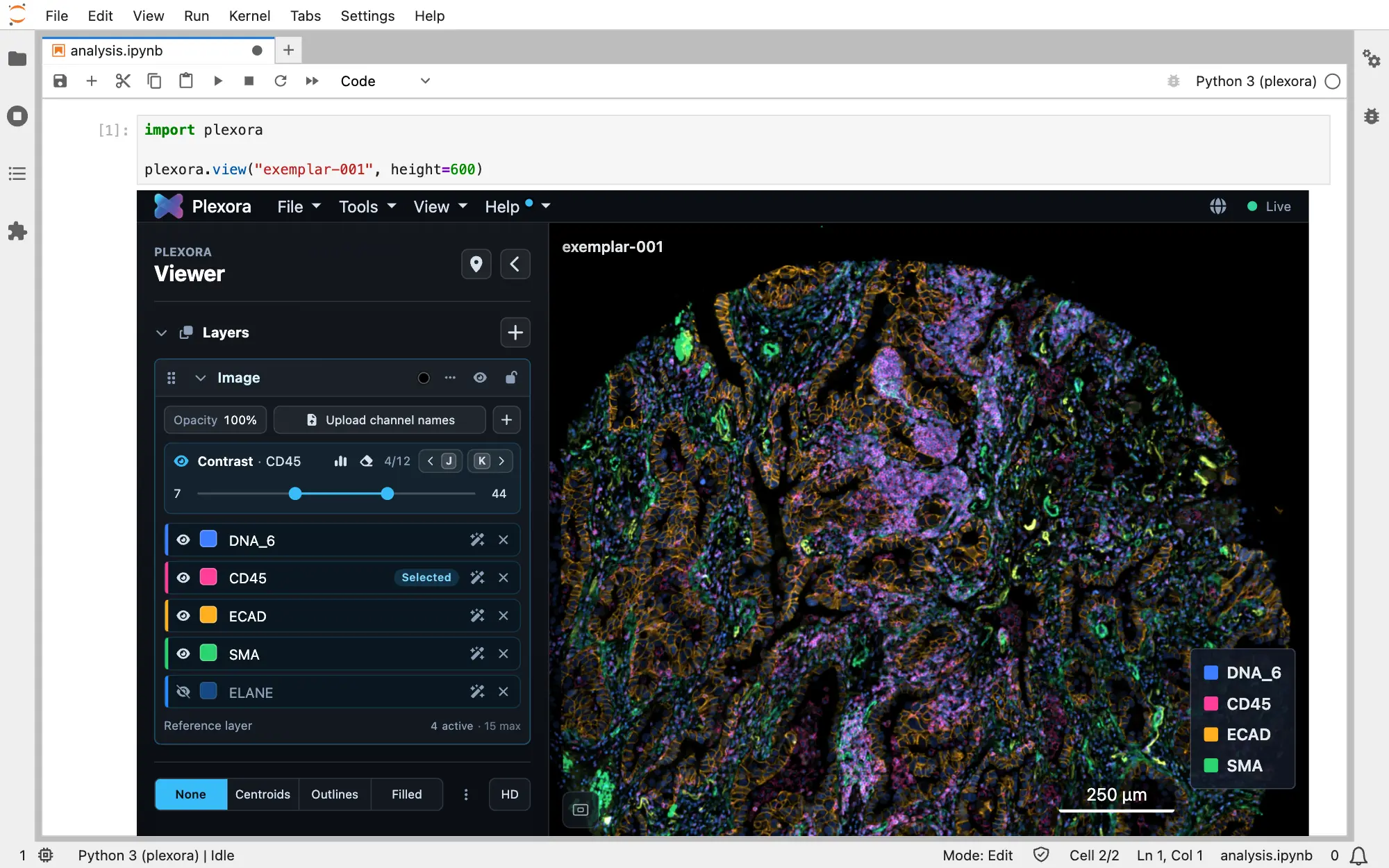
Make plexora.view(...) the last line of a cell and the viewer appears in the cell's output, next to the rest of your analysis. It works on a project you already have, or on data still in memory: an AnnData you just clustered, a SpatialData object, NumPy arrays or data frames.
How to use it
Install the notebook extra
pip install "plexora[jupyter]"Install it into the environment your notebook's kernel runs in. On Colab, !pip install plexora is enough.
Show something in the viewer
Make plexora.view(...) the last line of a cell. The first call starts a small Plexora beside your kernel; later calls reuse it. Pick whichever fits what you have:
import plexora

plexora.view("exemplar-001")
The name is a project you imported in the app or from Python.
Choose what the viewer opens with
tool opens a panel ("gating", "roi", "qc", "cell_explorer", "figure_builder"), overlay colours cells by a column, and channels turns channels on:
plexora.view("exemplar-001", channels={"DNA_6": {"color": "#3366ff"}, "CD45": None})These apply to this one viewer only. They are never saved to the project, so a plain plexora.view(name) still opens with the channels you last set by hand.
Show the next round of results
After you change the AnnData, push it to the same viewer instead of starting again:
sc.tl.leiden(adata, resolution=1.5, key_added="leiden_fine")
viewer.refresh(adata=adata)
The new column can then be chosen as an overlay. viewer.open() opens the same viewer in a browser tab.
Getting results out
There is no Python call that reads gates, regions or cell colours back from the viewer. Results leave the way they do in the app: Download Gates in Thresholding, Export in ROI (GeoJSON), Map to cells to write region columns onto the cell table, and Save Gates to Source File or ROI's Save to write back into an AnnData or SpatialData file. See Exporting.
Where it works
The call is the same everywhere. Plexora works out the viewer's address from the environment (proxy="auto").
| Environment | What you need |
|---|---|
| Jupyter Notebook, JupyterLab | plexora[jupyter] in the kernel's environment. |
| VS Code notebooks (local or Remote-SSH) | Nothing more; VS Code forwards the port. |
| JupyterHub | jupyter-server-proxy in the Jupyter server's environment (ask your administrator). |
| Open OnDemand | Nothing more. The viewer is protected by a token in its address; treat a copied link like a password. |
| Google Colab | Only plexora.view(...) in a cell; a terminal command cannot work there. |
Tips
- A blank or broken cell usually means the address guess was wrong.
proxy=Truealways routes through the notebook server;proxy=Falsealways uses127.0.0.1(right when you forward the port yourself). height=sets the iframe height in pixels (850 by default).- Data passed in memory lasts as long as the kernel. Add
to_disk=Trueto write an AnnData to an.h5adand register that file, so the project outlives the notebook.